---
title: "Data Visualization"
subtitle: "How to Make Dynamic Figures"
author: "08-Data Visualization"
format:
html:
toc: true
toc-depth: 2
code-fold: true
code-tools: true
code-summary: "Show answer"
df-print: paged
params:
show_answers: true # Set to false to hide all answer code but still render figures
execute:
freeze: auto
echo: true
warning: false
message: false
---
::: callout-tip
## How to render with/without answers
- **With answers (default)**: `quarto render exercises/data_viz.qmd`
- **Without answers** (figures only): `quarto render exercises/data_viz.qmd -P show_answers:false`
:::
::: callout-important
## Working with agentic AI
An agent can help you explore an API, diagnose an error, or propose variants. It cannot make the visual argument for you. For every redesign prompt below, state the audience and decision the figure supports; keep an AI-use log (prompt, output used, and changes you made); and verify every displayed encoding against the data. Do not submit a plot you cannot explain layer by layer.
:::
```{r}
#| label: setup
#| include: false
#| echo: false
# Load packages and set a default theme
suppressPackageStartupMessages({
library(tidyverse)
})
set.seed(123)
theme_set(theme_bw(base_size = 12))
```
# 1) Distribution: Histogram + Density Overlay (Diamonds)
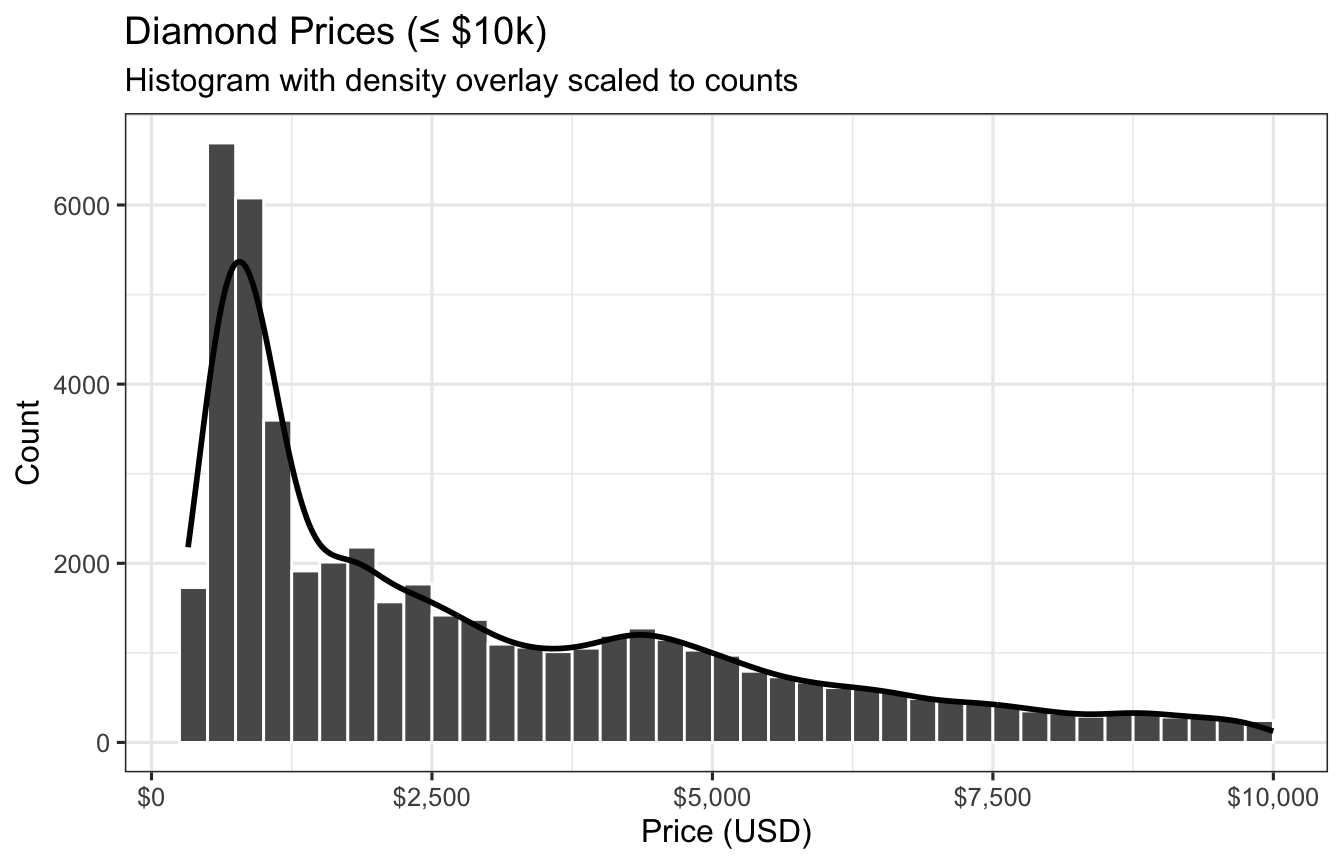
You are given `ggplot2::diamonds` (>50k rows). Create a histogram of **price** (restrict to \$10,000 or less for visibility), overlay a scaled density curve so both share a comparable y-scale, and style axes and labels.
**Requirements**
- Filter to `price <= 10000`.
- Histogram with a **binwidth of 250**.
- Overlay a **density** where `y = after_stat(count) * 250` so peaks align with histogram counts.
- Label axes and apply a dollar formatter to x-axis.
- Use `theme_bw()` and a concise title/subtitle.
```{r}
#| label: fig-diamonds-price
#| fig-cap: "Histogram and scaled density of diamond prices (≤ $10k)."
#| echo: !expr params$show_answers
#| code-summary: "Show answer code"
#| fig-width: 7
#| fig-height: 4.5
library(ggplot2)

p1 <- diamonds |>
  filter(price <= 10000) |>
  ggplot(aes(price)) +
  geom_histogram(binwidth = 250, boundary = 0, closed = "left", color = "white") +
  geom_density(aes(y = after_stat(count) * 250), linewidth = 1, alpha = 0.15, fill = NA) +
  scale_x_continuous(labels = scales::dollar_format(accuracy = 1)) +
  labs(
    title = "Diamond Prices (≤ $10k)",
    subtitle = "Histogram with density overlay scaled to counts",
    x = "Price (USD)", y = "Count"
  ) +
  theme(legend.position = "none")

p1
```
---
# 1.1) Redesign for a decision
Choose a nontechnical buyer deciding whether a diamond is in a plausible price range. Redesign the plot for that decision, then write 100–150 words explaining what you changed, what trade-off it creates, and why the density overlay is or is not still useful. An agent may propose options, but you must justify the final choice.
---
# 2) Bivariate: Scatter with LOESS Trend + Facets (MPG)
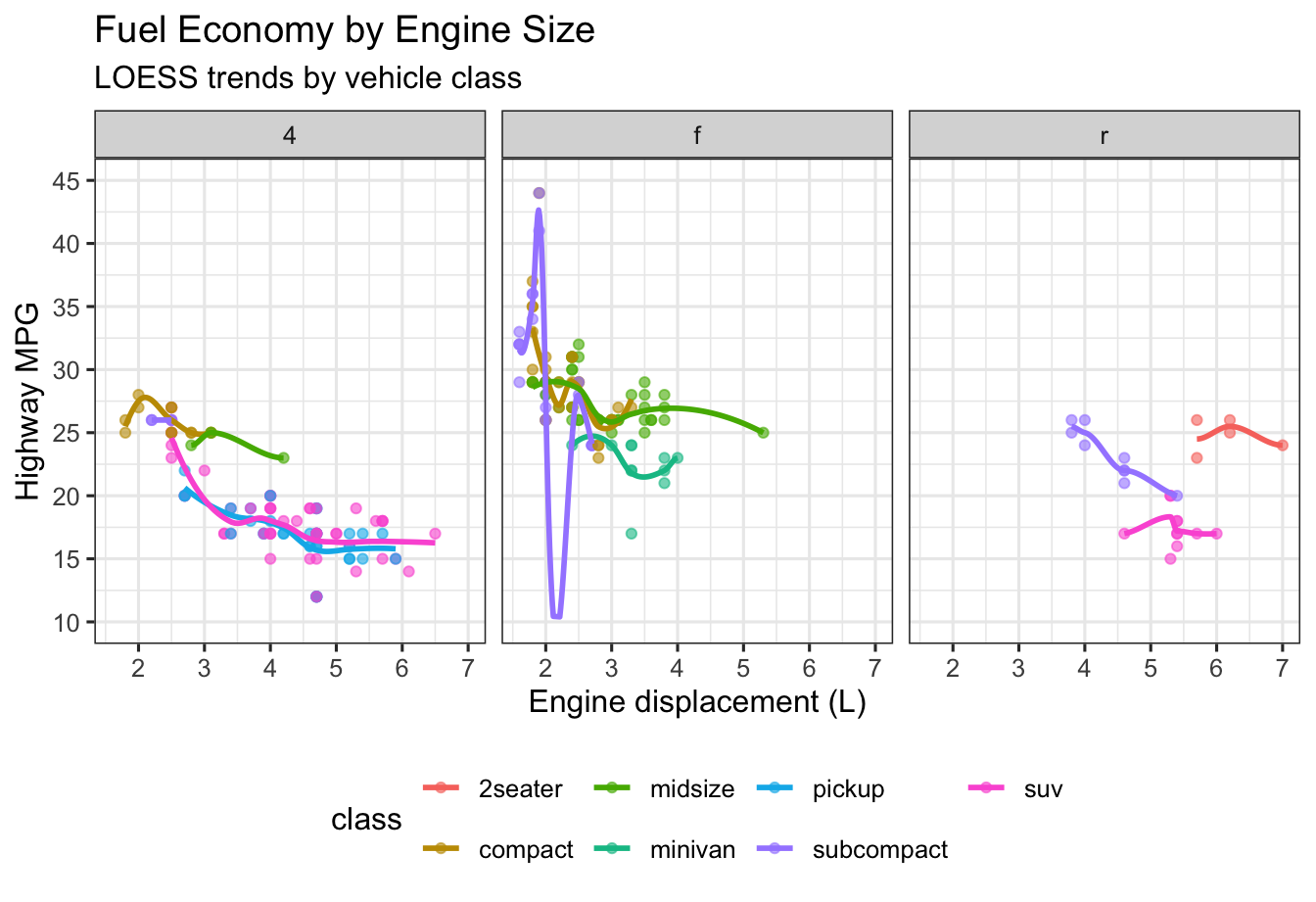
Using `ggplot2::mpg`, visualize **highway mileage (hwy)** vs **engine displacement (displ)**, colored by **class**. Add a LOESS smooth and facet by **drive (drv)**.
**Requirements**
- `geom_point(alpha = 0.6)` and `geom_smooth(se = FALSE, method = "loess")`.
- Axis limits: `y` from 10 to 45.
- Facet by `drv` with `facet_wrap(~ drv, nrow = 1)`.
- Place legend at the bottom.
```{r}
#| label: fig-mpg-scatter
#| fig-cap: "Highway MPG vs. engine displacement, colored by class, faceted by drive (mpg)."
#| echo: !expr params$show_answers
#| code-summary: "Show answer code"
#| fig-width: 7
#| fig-height: 4.8
mpg |>
  ggplot(aes(displ, hwy, color = class)) +
  geom_point(alpha = 0.6) +
  geom_smooth(se = FALSE, method = "loess") +
  scale_y_continuous(limits = c(10, 45), breaks = seq(10, 45, 5)) +
  labs(
    title = "Fuel Economy by Engine Size",
    subtitle = "LOESS trends by vehicle class",
    x = "Engine displacement (L)", y = "Highway MPG"
  ) +
  facet_wrap(~ drv, nrow = 1) +
  theme(legend.position = "bottom")
```
---
# 2.1) Audit a misleading default
Create a deliberately less informative version of this plot (for example, by changing scales, overplotting, or grouping), then repair it. Include a short caption identifying the specific inference that the bad version could encourage.
---
# 3) Small Multiples: Facet Wrap by Class (MPG)
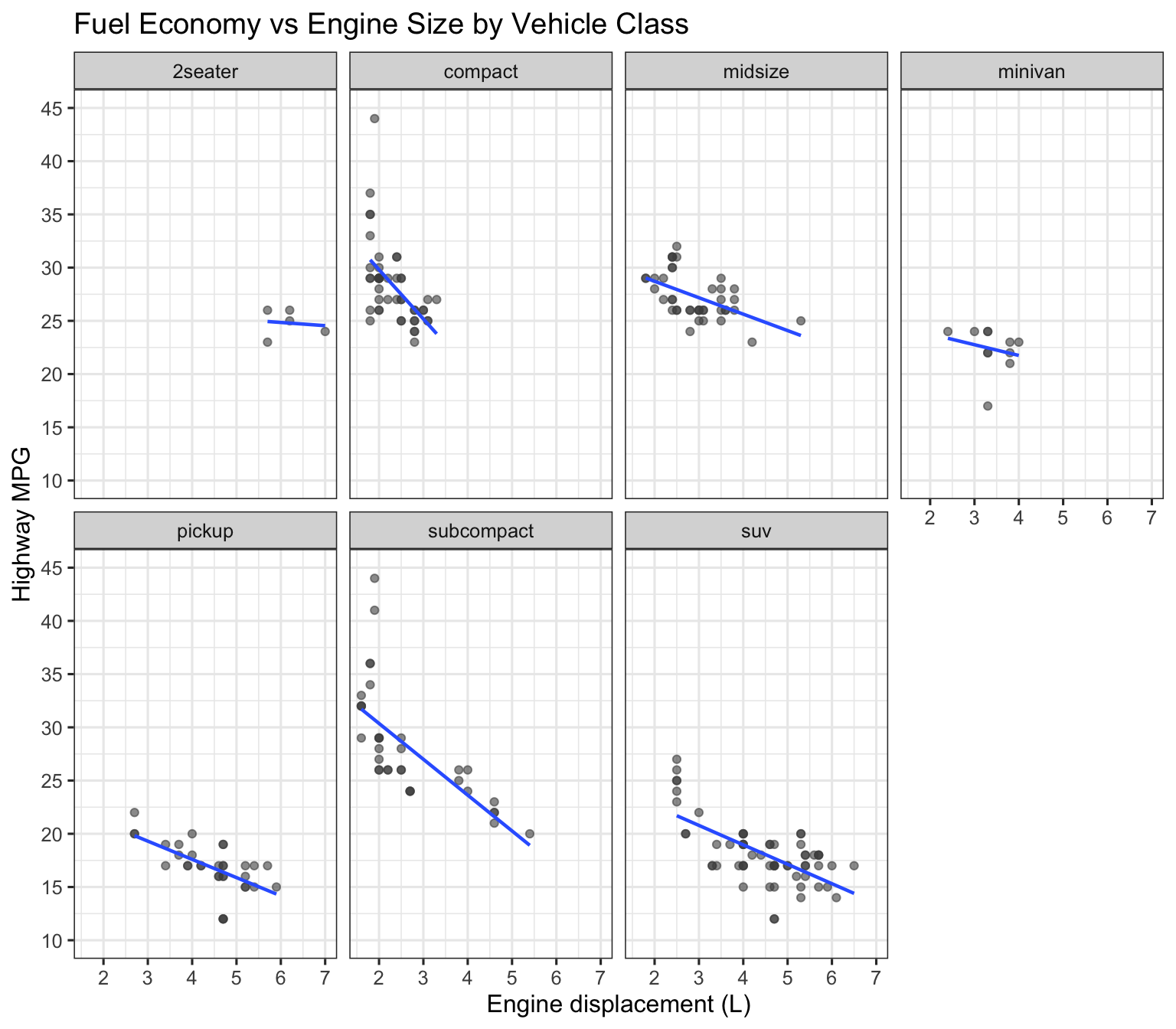
Produce small multiples of **hwy vs displ** but facet by **class** to compare patterns across vehicle classes.
**Requirements**
- Same base mapping as above; facet by `class` (`ncol = 4`).
- Use a consistent y-scale.
- Add a translucent linear fit per panel (`method = "lm"`).
```{r}
#| label: fig-mpg-facets
#| fig-cap: "Small multiples of hwy vs displ by vehicle class (linear fits)."
#| echo: !expr params$show_answers
#| code-summary: "Show answer code"
#| fig-width: 8
#| fig-height: 7
mpg |>
  ggplot(aes(displ, hwy)) +
  geom_point(alpha = 0.6, color = "grey30") +
  geom_smooth(method = "lm", se = FALSE, linewidth = 0.8, alpha = 0.9) +
  scale_y_continuous(limits = c(10, 45), breaks = seq(10, 45, 5)) +
  labs(
    title = "Fuel Economy vs Engine Size by Vehicle Class",
    x = "Engine displacement (L)", y = "Highway MPG"
  ) +
  facet_wrap(~ class, ncol = 4)
```
---
# 3.1) Make the above graph better
---
# 4) Time Series: Unemployment Rate with 12-Month Moving Average (economics)
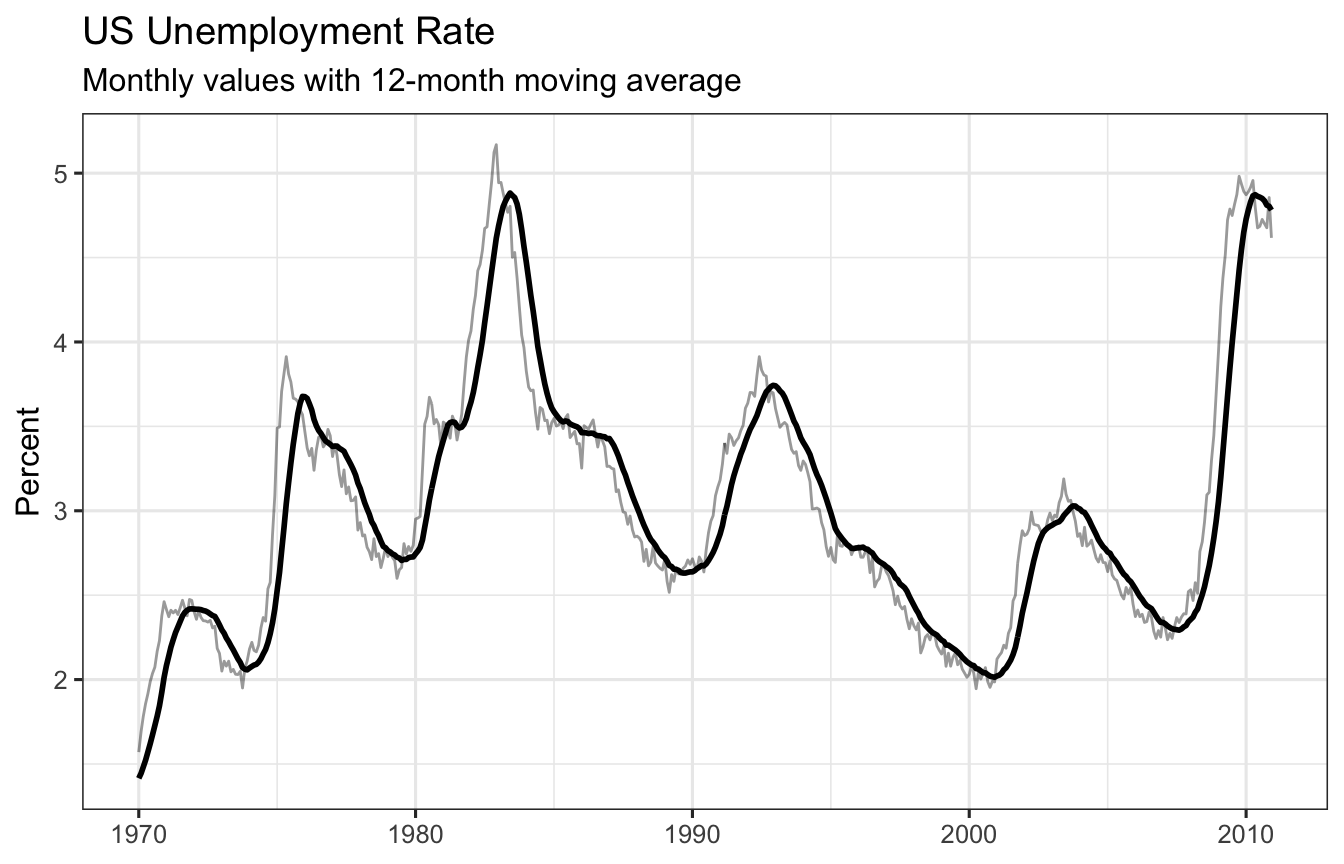
Using `ggplot2::economics`, compute the **unemployment rate** as `100 * unemploy / pop`. Plot the monthly rate and a 12-month moving average.
**Requirements**
- Create `urate = 100 * unemploy / pop`.
- Compute a 12-month moving average using `stats::filter`.
- Plot `urate` as a faint line and overlay the moving average as a thicker line.
- Limit the x-axis to 1970–2010 for focus.
```{r}
#| label: fig-economics-ma
#| fig-cap: "US unemployment rate with 12-month moving average (1970–2010)."
#| echo: !expr params$show_answers
#| code-summary: "Show answer code"
#| fig-width: 7
#| fig-height: 4.5
library(stats)

economics |>
  mutate(
    urate = 100 * unemploy / pop,
    ma12 = as.numeric(stats::filter(urate, rep(1/12, 12), sides = 1))
  ) |>
  filter(date >= as.Date("1970-01-01"), date <= as.Date("2010-12-31")) |>
  ggplot(aes(date, urate)) +
  geom_line(alpha = 0.4) +
  geom_line(aes(y = ma12), linewidth = 1) +
  labs(
    title = "US Unemployment Rate",
    subtitle = "Monthly values with 12-month moving average",
    x = NULL, y = "Percent"
  )
```
---
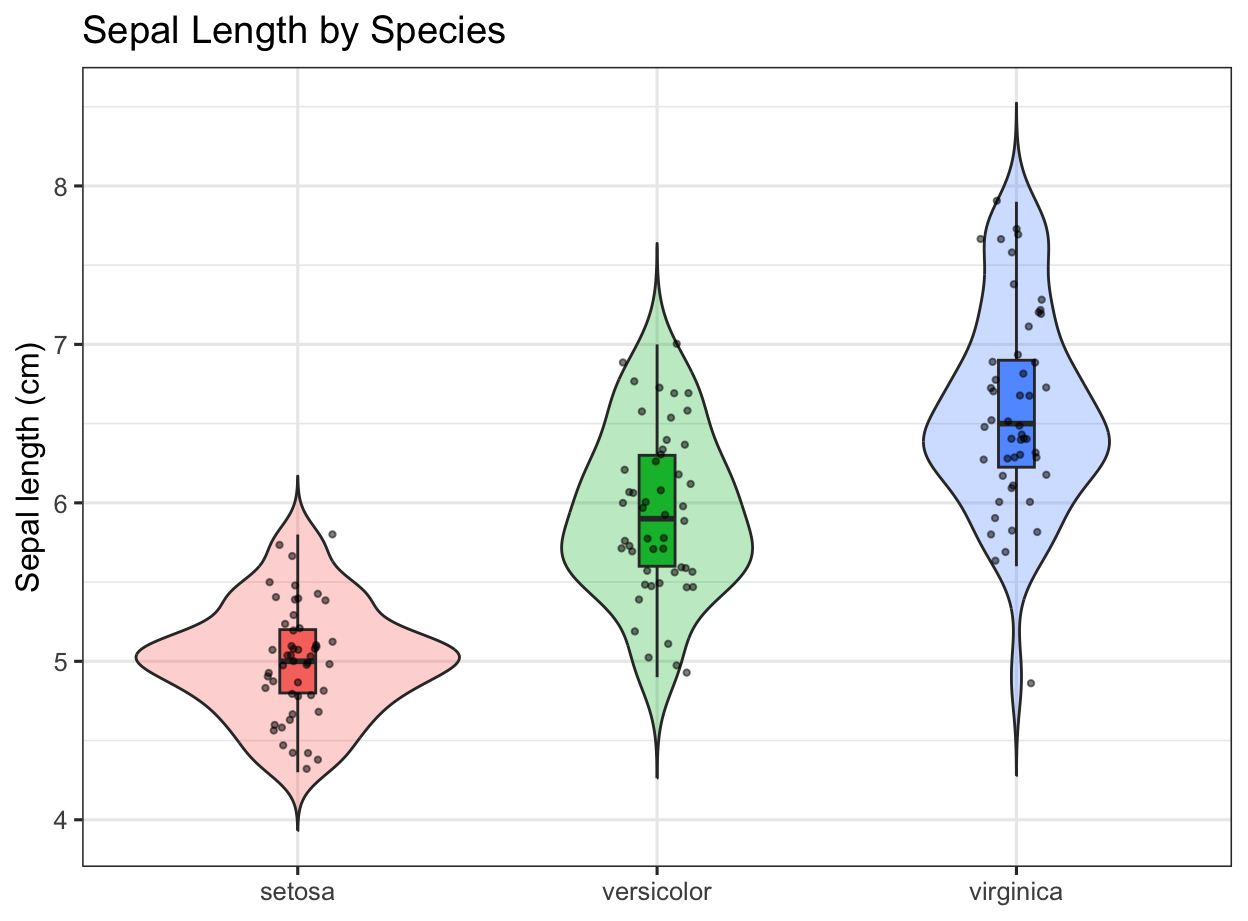
# 5) Distribution by Group: Violin + Box + Jitter (iris)
Using `datasets::iris`, compare **Sepal.Length** by **Species** with violins, embedded boxplots, and jittered points. Reorder species by median sepal length.
**Requirements**
- Reorder x-axis by median `Sepal.Length`.
- Use `geom_violin(trim = FALSE, alpha = 0.3)` + `geom_boxplot(width = 0.1, outlier.shape = NA)`.
- Add `geom_jitter(width = 0.1, alpha = 0.5, size = 0.8)`.
- Hide the fill legend and label clearly.
```{r}
#| label: fig-iris-violin
#| fig-cap: "Sepal length distributions by species (iris)."
#| echo: !expr params$show_answers
#| code-summary: "Show answer code"
#| fig-width: 6.5
#| fig-height: 4.8
iris |>
  as_tibble() |>
  mutate(Species = fct_reorder(Species, Sepal.Length, .fun = median)) |>
  ggplot(aes(Species, Sepal.Length, fill = Species)) +
  geom_violin(trim = FALSE, alpha = 0.3) +
  geom_boxplot(width = 0.1, outlier.shape = NA) +
  geom_jitter(width = 0.1, alpha = 0.5, size = 0.8) +
  guides(fill = "none") +
  labs(
    title = "Sepal Length by Species",
    x = NULL, y = "Sepal length (cm)"
  )
```
---
# 5.1) Make the above graph better
---
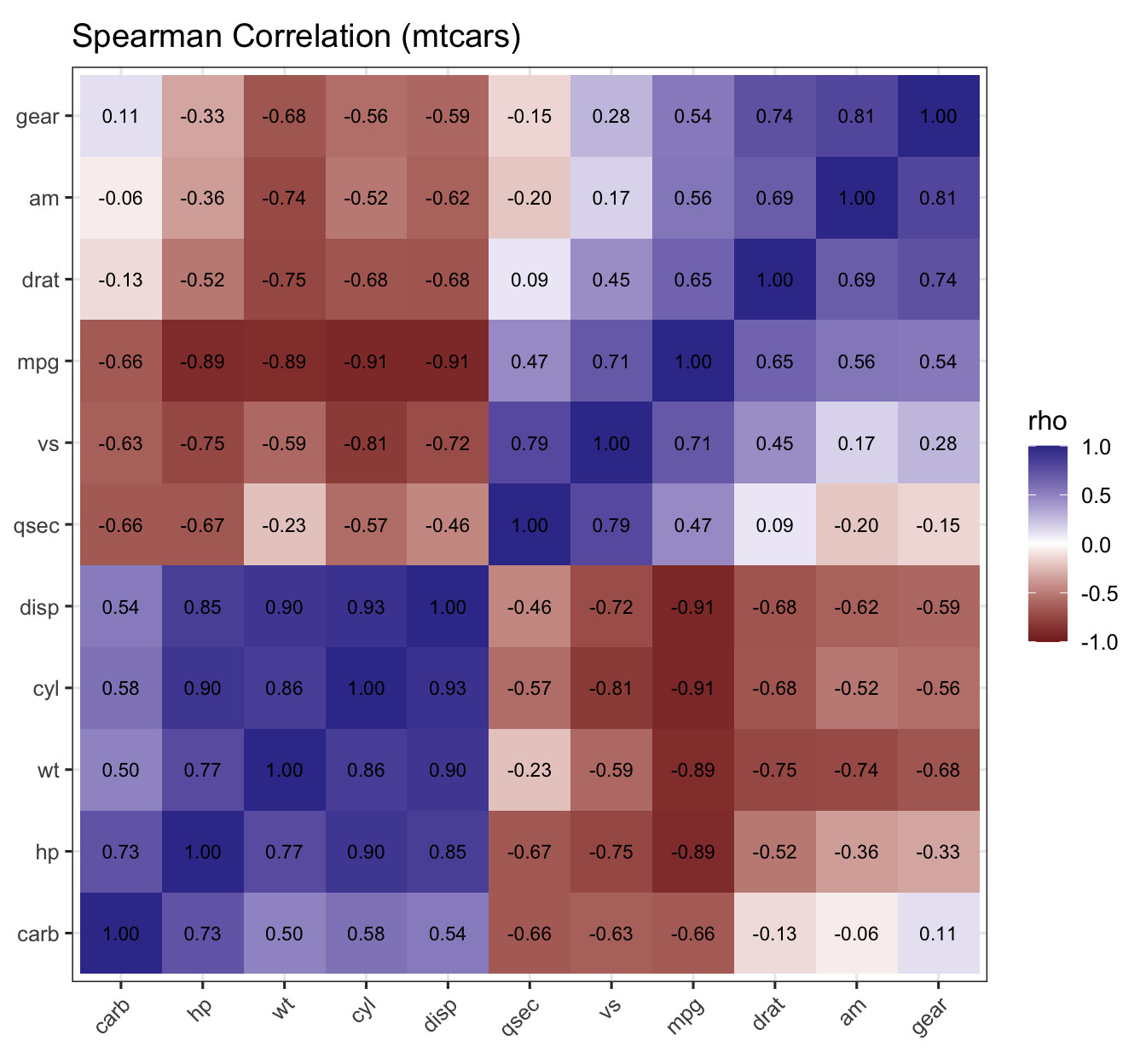
# 6) Correlation Heatmap with Clustering (mtcars)
Compute a **Spearman correlation matrix** for numeric variables in `mtcars`, cluster variables, and display a heatmap with correlation values.
**Requirements**
- Compute Spearman correlations on numeric columns.
- Order variables using hierarchical clustering on `1 - r`.
- Use `geom_tile()` and `scale_fill_gradient2()` with limits `c(-1, 1)`.
- Add rounded correlation labels.
```{r}
#| label: fig-mtcars-corr
#| fig-cap: "Spearman correlation heatmap with hierarchical clustering (mtcars)."
#| echo: !expr params$show_answers
#| code-summary: "Show answer code"
#| fig-width: 7
#| fig-height: 6.5
num <- mtcars |> select(where(is.numeric))
R <- cor(num, method = "spearman", use = "pairwise.complete.obs")
ord <- hclust(as.dist(1 - R))$order
lvl <- colnames(R)[ord]

corr_df <- as.data.frame(R) |>
  rownames_to_column("var1") |>
  pivot_longer(-var1, names_to = "var2", values_to = "r") |>
  mutate(
    var1 = factor(var1, levels = lvl),
    var2 = factor(var2, levels = lvl)
  )

ggplot(corr_df, aes(var2, var1, fill = r)) +
  geom_tile() +
  geom_text(aes(label = sprintf("%.2f", r)), size = 3) +
  scale_fill_gradient2(limits = c(-1, 1)) +
  coord_fixed() +
  labs(x = NULL, y = NULL, fill = "rho",
       title = "Spearman Correlation (mtcars)") +
  theme(axis.text.x = element_text(angle = 45, hjust = 1))
```
---
# 6.1) Make the above graph better
---
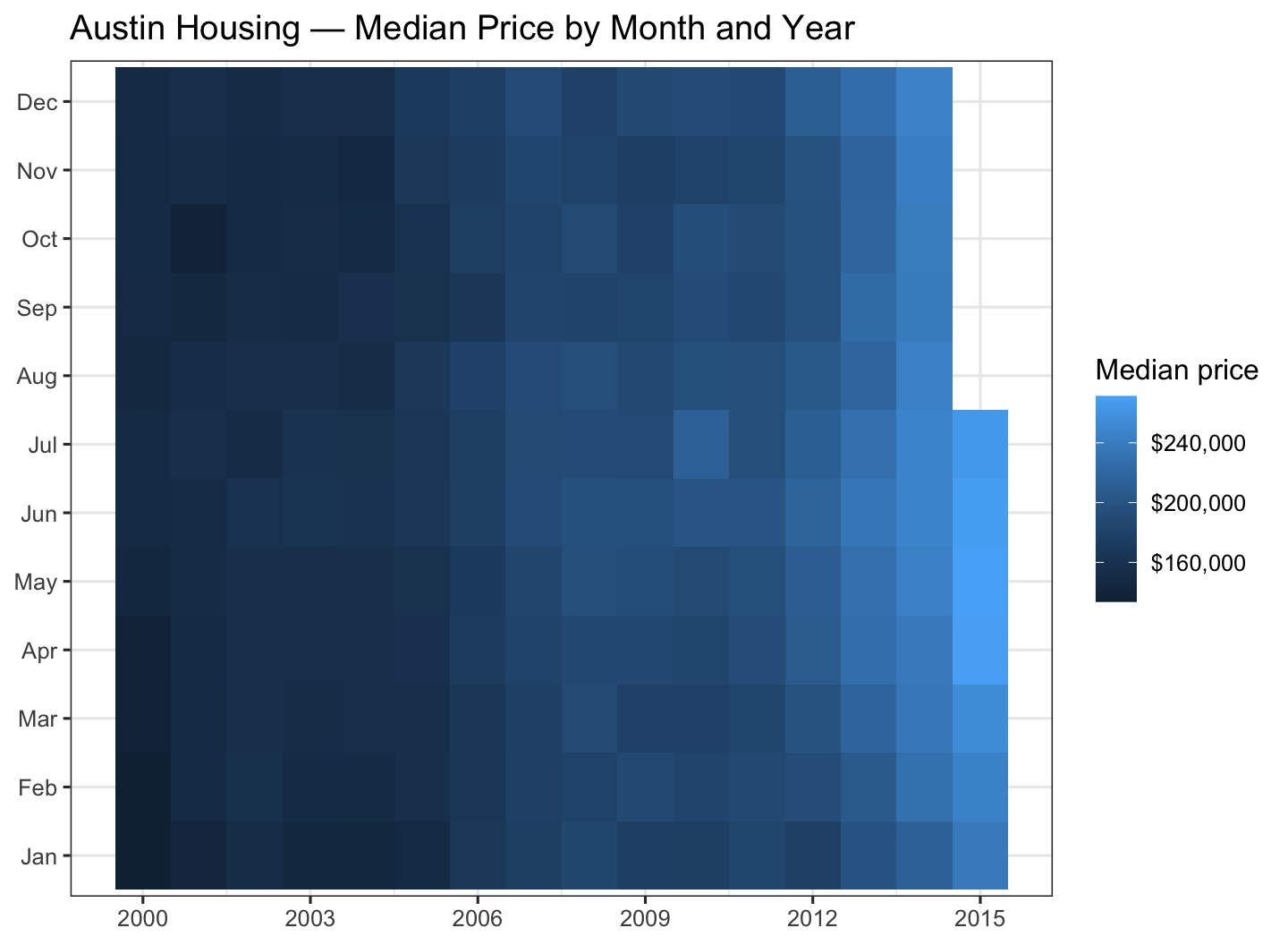
# 7) Tile Heatmap: Housing Prices by Month × Year (txhousing)
Using `ggplot2::txhousing`, create a month × year **heatmap** of median home prices for **Austin**.
**Requirements**
- Filter city to `"Austin"`.
- Limit years to 2000–2015.
- Y-axis should be month (Jan–Dec).
- Fill tiles by `median` (median sales price).
- Add a readable color scale and labels.
```{r}
#| label: fig-txhousing-heatmap
#| fig-cap: "Median home price (Austin): month × year heatmap (txhousing)."
#| echo: !expr params$show_answers
#| code-summary: "Show answer code"
#| fig-width: 7.5
#| fig-height: 5.5
# subset and prepare month labels
au <- txhousing |>
  filter(city == "Austin", year >= 2000, year <= 2015) |>
  mutate(Month = factor(month, levels = 1:12, labels = month.abb))

ggplot(au, aes(year, Month, fill = median)) +
  geom_tile() +
  scale_fill_gradient(labels = scales::dollar, name = "Median price") +
  scale_x_continuous(breaks = seq(2000, 2015, by = 3)) +
  labs(
    title = "Austin Housing — Median Price by Month and Year",
    x = NULL, y = NULL
  ) +
  theme(legend.position = "right")
```
# 7.1) Make the above graph better
---
# 8) Mini data-story: critique, build, and verify
Choose one dataset used above or a small, public dataset relevant to your interests. Pose one answerable descriptive question for a named audience. Create a two-figure data story: one overview and one supporting or qualifying view. Each figure needs an informative title, a caption that states the takeaway, and accessible color/label choices.
Use an AI agent for at least one bounded task (such as proposing a chart type, checking a `ggplot2` API detail, or reviewing labels). Submit the prompt and a brief verification note. Your final write-up (250–400 words) must explain why each encoding is appropriate, name one limitation, and identify one change you rejected after inspecting the data. Put the analysis in a reproducible `.qmd` or `.R` file.
## Appendix: Session Info (hidden)
```{r}
#| label: session-info
#| echo: false
#| include: false
sessioninfo::session_info()
```